Install Hexplore-It

Step 1

Installing a modpack using the Technic Launcher is easy. If you don't already have the launcher downloaded, visit our download page to get the latest version.

Step 2
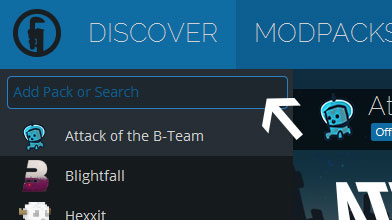
Type in the modpack name (Hexplore-It) or paste the following url into the search box.

Step 3

Finally, click Install at the bottom right of the launcher after you select Hexplore-It from the list on the left. The launcher will handle everything else!

Hexplore-It

by mine_my_own_bizz
Version v1.09 • Minecraft 1.6.4
I just pushed what will probably be the final update to Hexplore-It other than minor bug-fixing, or the addition of player submitted servers to the IP list.
mine_my_own_bizz mine_my_own_bizz in Hexplore-It ·

Comments

can i continue hexplore-it?
averyspecialblossom averyspecialblossom ·
Is there an issue with the server files? I noticed that there are almost no servers for this pack and would love to set one up. I am having major stability issues. I was able to log in twice locally, but after that, it hasn't been accepting any connections locally or remotely.
Sigma207 Sigma207 ·
Every time I play single player, the mod pack does this to me: "Shutting down internal server" and gives me a error saying that Mine Craft is out of memory. I downloaded this from Technic Launcher.
john16191 john16191 ·
Replies
Does anyone have a solution to my problem?
john16191 john16191 ·
How much Ram do u have in your computer?? as its possible you don't have enough ram to support running this modpack or you have used to much ram dedicated to one thing and is unable to get enough ram to run both your computer and the modpack at the same time.
wolfy1662 wolfy1662 ·
hello,why your modpack doenst want to install?
Doritz Doritz ·
Latest Update
I just pushed what will probably be the final update to Hexplore-It other than minor bug-fixing, or the addition of player submitted servers to the IP list.