
Install Hexplore-It

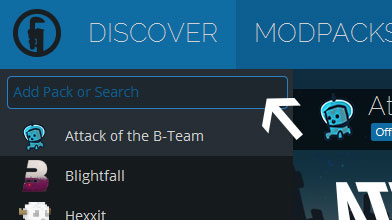
Step 1

Installing a modpack using the Technic Launcher is easy. If you don't already have the launcher downloaded, visit our download page to get the latest version.

Step 2

Type in the modpack name (Hexplore-It) or paste the following url into the search box.

Step 3

Finally, click Install at the bottom right of the launcher after you select Hexplore-It from the list on the left. The launcher will handle everything else!

Hexplore-It

by mine_my_own_bizz
Version v1.09 • Minecraft 1.6.4

Changelogs

««« Changelog »»» > = Changed, tweaked, finagled, played with, etc... ^ = updated + = added the mod to the pack - = removed the mod from the pack VERSION 1.09 >Changed a Voxel Menu thingy, Book changed, switched a few configgy-muh-bobbers ^BiomesOPlenty 1.2.1.434 ^DoomlikeDungeons 1.5.1 ^Forge 9.11.1.1345 ^hungeroverhaul …
Continue reading →
***OPEN TO ANY AND ALL SUGGESTIONS*** This would include mods to add, mods to get rid of, mod updates that are available, better mod-spotlight videos, config tweaking, etc... I will also consider any and all submissions on the forums for new modpack logos and backgrounds. Also feel free to submit …
Continue reading →
Latest Update
I just pushed what will probably be the final update to Hexplore-It other than minor bug-fixing, or the addition of player submitted servers to the IP list.