Install Hexplore-It

Step 1

Installing a modpack using the Technic Launcher is easy. If you don't already have the launcher downloaded, visit our download page to get the latest version.

Step 2
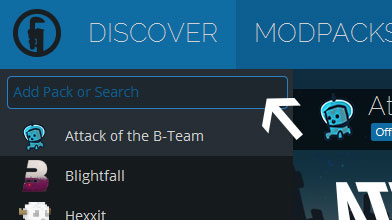
Type in the modpack name (Hexplore-It) or paste the following url into the search box.

Step 3

Finally, click Install at the bottom right of the launcher after you select Hexplore-It from the list on the left. The launcher will handle everything else!

Hexplore-It

by mine_my_own_bizz
Version v1.09 • Minecraft 1.6.4
I think I made the right choice by just waiting all the changes out. Things are looking better now and 1.7.10 is coming along nicely. :D
mine_my_own_bizz mine_my_own_bizz in Hexplore-It ·

Comments

How in the world do I turn off the music in game? I have music off as always but I still get what sounds like battle music? Also is there a way to turn off the wind/ocean/bee etc sounds???
Violentdawg Violentdawg ·
Replies
1. Not really a "bug" per se but if you notice that the custom Hexplore-It music is overlapping with the vanilla music you can turn down your music volume all the way and the custom music will still play. If you absolutely hate the music and it is driving you crazy: Delete all files here ---> mods\matmos\packs\matmos_default\assets\minecraft\sound\matmos_MSI\music as far as the other sounds go the normal volume adjustments will fix it. If you absolutely can't stand it at all delete the matmos mod.
mine_my_own_bizz mine_my_own_bizz · Creator ·
Latest Update
I just pushed what will probably be the final update to Hexplore-It other than minor bug-fixing, or the addition of player submitted servers to the IP list.