
🛠️ Wolf Pack Cobblemon – Help & Support
Need help installing the modpack, joining the server or using our custom features? We're here to help! 🐺💙
📥 Installation Help
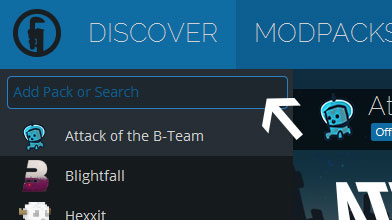
- Download and install Technic Launcher.
- Search for Wolf Pack Cobblemon.
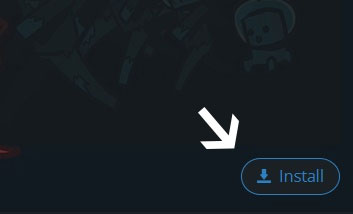
- Click Install.
- Once installed, click Play.
- Join our Minecraft server and start your adventure!
⚙️ Having Problems?
If you're experiencing crashes, missing textures, connection problems or modpack installation issues, please try the following:
- Restart Technic Launcher.
- Make sure you're using the latest version of our modpack.
- Check that you're launching the correct Wolf Pack Cobblemon installation.
- Try reinstalling the modpack if files are missing or corrupted.
- Contact our community for further assistance.
🎮 Useful In-Game Commands
/help – Open the Wolf Pack help menu.
/rtp – Teleport to a random safe location.
/kits – Claim available kits.
/skills – View your player skills.
/warps – Open the server warp menu.
/dex – View Pokédex progression rewards.
/discord – Get our Discord community invite.
/link – Link your Minecraft account with Discord.
🐺 Contact & Support
🌐 Website: https://www.wolfpackcobblemon.co.uk
🛒 Store: https://wolf-pack-cobblemon.tebex.store
🐺 Discord: https://discord.wolfpackcobblemon.co.uk
For support, questions, suggestions or bug reports, join our Wolf Pack Discord community using /discord in-game.
Our team will do their best to help you get back to your Pokémon adventure.
💙 Thank you for being part of Wolf Pack Cobblemon!