
Install TheFlashSpeedsterCwModpack

Step 1

Installing a modpack using the Technic Launcher is easy. If you don't already have the launcher downloaded, visit our download page to get the latest version.

Step 2

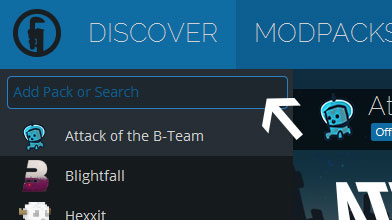
Type in the modpack name (TheFlashSpeedsterCwModpack) or paste the following url into the search box.

Step 3

Finally, click Install at the bottom right of the launcher after you select TheFlashSpeedsterCwModpack from the list on the left. The launcher will handle everything else!

TheFlashSpeedsterCwModpack

by BoyBanana
Version 2.4 • Minecraft 1.12
TheFlashSpeedsterCwModpack was updated to version 2.4 ·
TheFlashSpeedsterCwModpack was updated to version 2.3 ·
Fixed some bugs
BoyBanana BoyBanana ·
TheFlashSpeedsterCwModpack was updated to version 2.1 ·
TheFlashSpeedsterCwModpack was updated to version 2.0 ·
TheFlashSpeedsterCwModpack was updated to version 1.0 ·
Latest Update
TheFlashSpeedsterCwModpack was updated to version 2.4