
Install Stigma Cobblemon

Step 1

Installing a modpack using the Technic Launcher is easy. If you don't already have the launcher downloaded, visit our download page to get the latest version.

Step 2

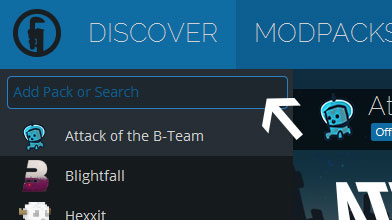
Type in the modpack name (Stigma Cobblemon) or paste the following url into the search box.

Step 3

Finally, click Install at the bottom right of the launcher after you select Stigma Cobblemon from the list on the left. The launcher will handle everything else!

Stigma Cobblemon

by DOGMATICAL
Version 3.2.4 • Minecraft 1.21.1

Need help? Join our Discord: https://discord.gg/CwsGQGgjd9 and open a ticket.

The game crashes or is very slow

  • Allocate at least 4 GB of RAM: Launcher Options > Java Settings > Memory.
  • Use Java 21 (Launcher Options > Java Settings).

My resource packs disappeared

  • Close the game, then in Modpack Options click Reinstall. Your worlds and settings are kept.

I can't join the server

  • Make sure the pack is up to date: the launcher shows a green arrow when an update is available.
Latest Update
Stigma Cobblemon was updated to version 3.2.4